> For the complete documentation index, see [llms.txt](https://docs.din.lol/din-cook-data-for-ai/llms.txt). Markdown versions of documentation pages are available by appending `.md` to page URLs; this page is available as [Markdown](https://docs.din.lol/din-cook-data-for-ai/how-to-join/earn-usddin.md).
# Earn $DIN
### Unlock Node Rewards
Holders of Tier 2 to Tier 10 nodes will earn $DIN as node-running rewards. [How to earn rewards?](/din-cook-data-for-ai/how-to-join/chipper-node-explained/how-to-run-chipper-node.md)
* **Total Rewards**: This represents your cumulative node rewards.
* **Ready-to-Unlock Amount**: This is your rewards amount minus any requested unlock amount.
* **Unlocked Amount**: This refers to the amount you have successfully claimed.
If you want to check more detailed progress, hover over the progress bar to view more detailed information about your rewards.
#### Step-by-step guide
Follow these steps to claim your rewards:
1. Raise an Unlock Request by clicking the **'Unlock'** button.\
Users can claim $DIN gradually based on an unlocking schedule:
* **25%** of the requested unlock amount is available after 30 days.
* **60%** is available after 90 days.
* **100%** is available after 120 days.
2. Simply click the **'Claim'** button to claim the corresponding amount. Note that this is a one-time action.
### DIN Rewards
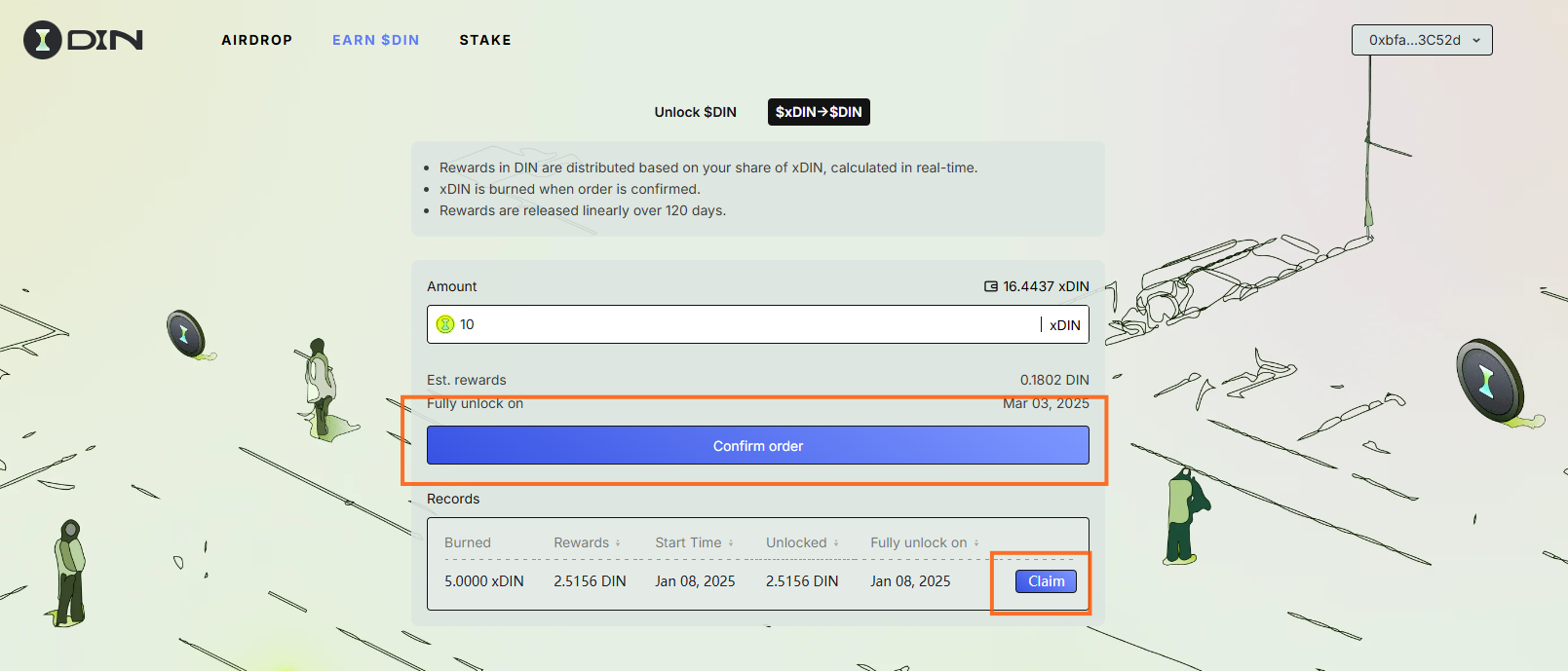
Exchange your xDIN for DIN rewards easily!
* **Rewards Distribution**: DIN rewards are distributed in real-time based on your share of xDIN.
* **Burn Mechanism**: xDIN is burned once the order is confirmed.
* **Reward Release Schedule**: Rewards are released linearly over 120 days.
#### How to Exchange xDIN for DIN Rewards
1. **Enter xDIN Amount**\
Input the desired amount of xDIN in the input box and confirm your order.
2. **Track Your Rewards**\
After confirming, a new record will appear in the **'Records'** table.
* **Unlocked Amount**: This is the portion of rewards released linearly over the 120-day period.
* To claim the unlocked amount, simply click the **'Claim'** button. The unlocked rewards will then be added to your account.
3. **Important Note**\
Once the 120-day period is over, no additional rewards will be generated.